RiyazStudio
Tanpura, Tabla, Lehra & Swarmandal in one powerful platform for Indian Classical Music practice.
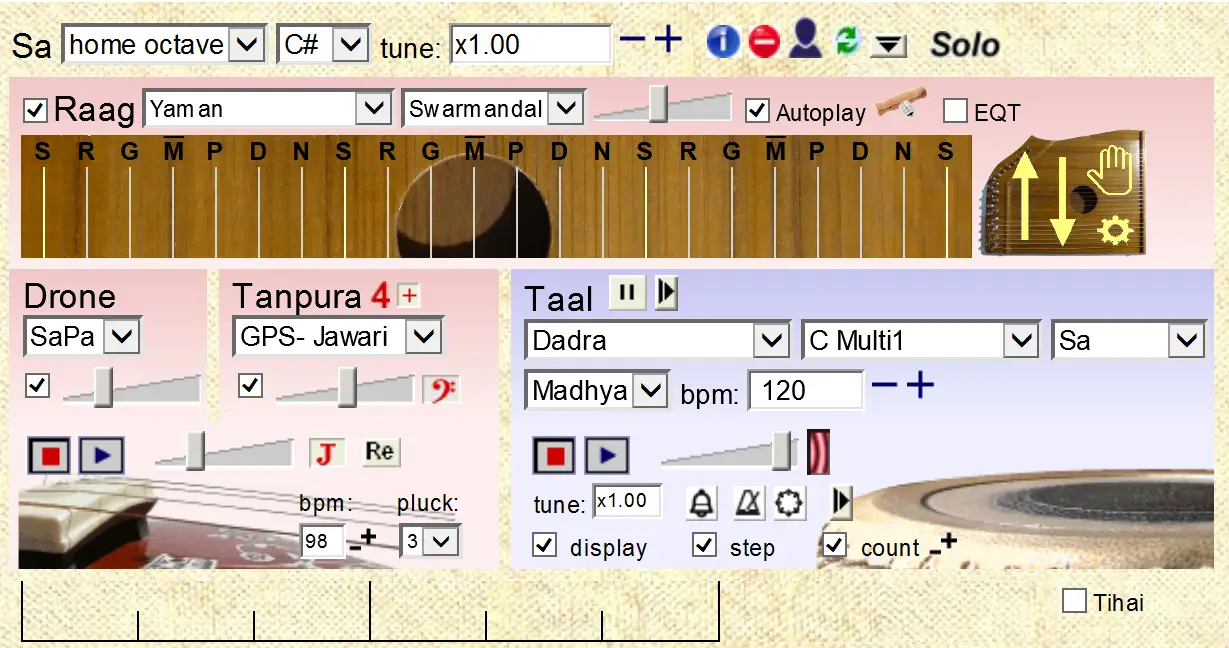
Professional Music Practice Software
RiyazStudio is the ultimate computer-based companion for Indian classical music practitioners. With high-quality sampled sounds of Tanpura, Tabla, Lehra and Swarmandal, it transforms your Windows PC into a complete practice studio.
Whether you are a beginner or a seasoned performer, RiyazStudio provides the perfect accompaniment for your riyaz (practice) sessions.
Choose Your Version
RiyazStudio comes in four distinct versions. Each is designed to cater to different aspects of Indian classical music practice.
- High-quality sampled Tanpura with adjustable pitch & fine tuning
- Tabla accompaniment with 200+ taal variations at any tempo
- Built-in Drone for continuous tonal reference
- Ideal for vocalists and instrumentalists
- Includes Dholak, Bongo, Tambourine and other rhythm instruments
- Perfect for Bhajan, Ghazal, Thumri and light classical
- Multiple rhythm patterns with flexible tempo control
- Tanpura and drone included
- Realistic Swarmandal (Indian Autoharp) simulation
- Over 100 ragas with authentic note patterns
- Adjustable speed and pitch to match your voice
- Essential for serious vocal practice
- Authentic Lehra (Nagma) instrumental melodies
- 14 different taals with multiple compositions
- Harmonium and Sarangi sound options
- Essential for Tabla players and rhythm practice
Not a Machine. A Performance.
RiyazStudio doesn't use mechanical tabla machines or synthesized loops. Every tanpura, tabla, pakhawaj and lehra sound is replayed from real recorded performances, so it breathes and grooves like a live accompanist.
Real Recorded Performances
No mechanical loops — every tabla, pakhawaj and lehra phrase is recorded from real musicians for a natural, breathing feel.
Fine-Tune to Your Pitch
A single tuning control adjusts tanpura, drone and tabla together — matched exactly to your voice or instrument.
Live Tempo Control
Tap the B key to set tempo on the fly, mid-practice — no need to stop and adjust settings.
More Than Just Accompaniment
Every RiyazStudio version includes these additional tools to sharpen your rhythm and timing.
Bell on Sum
An audible cue marks your position in the taal — useful if your sound system is light on bass.
Metronome
Add emphasis to the beat, split a slow tempo into sub-beats, or support cross-rhythm practice.
Tambourine
Emphasize the strong beats of the taal for extra rhythmic clarity.
Tihai Tool
Create and edit your own tihais and chakradas, then practice until you've mastered the cross-rhythm.
Choose Your Package
Every purchase comes with a registration code that activates Riyaz Studio on your PC. Choose 1 PC or 2 PC licenses as per your need.
- Professional music practice software for Windows PC
- Four versions available: Standard, Semi-Classical, Swarmandal, Lehra
- Includes Tanpura, Tabla, Dholak, Swarmandal and Lehra accompaniment
- 200+ taal variations · 100+ ragas · 14 taals for Lehra
- Activation via registration code — choose 1 PC or 2 PC license
- One-time payment — no recurring fees, no subscription.
- License code delivered via WhatsApp or email once payment is confirmed.
- Free installation guidance and activation support from our team.
How to Order
4 simple steps from form to activation
1 Fill the Order Form
Click "Order Now" and fill in your details — version, name, and WhatsApp number. Takes under a minute.
2 Pay Securely Online
Pay right there in the form — UPI, card or netbanking. Your order is confirmed the moment the payment goes through.
3 We Verify Your Order
Our team checks your package and version, and gets your registration code ready. No screenshot needed.
4 Receive Your License Code
After payment confirmation, your Riyaz Studio registration code will be sent via WhatsApp or Email.
Ready to Order RiyazStudio?
Fill the form or contact us directly for any queries
How to Install & Register
Once you receive your license code, follow these steps to activate Riyaz Studio on your PC.
Download the Setup
Download the setup file matching your purchased version: Standard · Semi-Classical · Swarmandal · Lehra
Run the Installer
Run the setup on your PC and complete the installation. A Riyaz Studio icon will appear on your desktop.
Enter License Code
Open Riyaz Studio. Enter the license code you received. Note: Your computer must be connected to the internet during registration.
Ready to Use
In the Computer Name field, enter any name. Register using your email ID — your Riyaz Studio is ready!
Frequently Asked Questions
The continuous drone is there to add "body" to the tanpura sound — to root you even more firmly in the tonality into which you place your notes. If you sometimes find the strokes of the tanpura distracting, you might even use the drone on its own.
You don't have to buy anything beyond your initial two-computer registration key to keep RiyazStudio running on two computers.
If you reformat or reinstall a computer, and you've been using a recent version of RiyazStudio (August 2008 onwards), the system will recognize your computer when you register again — you won't have "used up" an extra license.
RiyazStudio works only on Windows — or emulations of it. A basic way of running Windows on a Mac is through BootCamp, or via a virtual machine like Parallels Desktop.
RiyazStudio runs on Windows 98 through Windows 11. It doesn't need a new computer — a fairly old and slow PC works fine, as long as you have a few GB of hard disk space and a decent sound system.
No. RiyazStudio is designed specifically for Windows PC and there are no plans to convert it for mobile platforms.
No — a single tuning control adjusts all three together. Fine-tuning the tabla separately is possible, but you're unlikely to ever need it.
Minor upgrades are free, delivered as a simple download. Major upgrades or add-ons won't cost more than the price difference between versions.
Try them all — RiyazStudio remembers your choice between sessions. Whatever pitch you sing or play at, do try the E tabla samples; they tend to sound good across most sound systems.
No. RiyazStudio is a practice companion, not a substitute. It's important to also have regular sessions with a real teacher or tabla player — RiyazStudio won't interact with you or respond to your playing.
Each computer needs to connect to the internet briefly, just once, to complete licensing. After that, no connection is required. If your computer has no internet access at all, message our team on WhatsApp for offline registration help.